Categories
Police Lights & Siren Issues (FiveM Guide)
Many users experience problems with police lights - either with sound or visual effects.
This guide explains both issues and how to fix them.
Siren Sound Issue
Why don’t vehicles have siren sounds by default?
In GTA V:
- Police vehicles like
policeorpolice3have built-in siren sounds - These sounds are part of the vehicle’s configuration and play alongside the engine
Regular civilian vehicles:
- Only have engine sounds
- Do not include sirens by default
Our vehicles use standard vehicle sounds without sirens
How to Add Siren Sounds
✅Option 1 - Renewed SirenSync
A widely used FiveM resource that:
- Synchronizes siren sounds across players
- Adds sirens to vehicles that don’t have them by default
- Fixes unstable or desynced sirens
✅Option 2 - Luxart Vehicle Control
An advanced vehicle control script that:
- Adds realistic interaction with emergency vehicles
- Includes siren control and additional features
- Expands default GTA vehicle functionality
Note:
We do not provide support for configuring these scripts. Please refer to their official GitHub pages or community forums.
Siren Visual Issue (Lights Not Working Properly)
This is a common issue and is usually caused by:
- Conflicting SirenIDs
This is not related to the vehicle model itself
How to Fix Visual Siren Issues
✅Step 1 – Locate Meta Files
Go to your vehicle files and find:
- carvariations.meta
- carcols.meta
✅Step 2 – Edit carcols.meta
- Open the file (VS Code / Notepad)
- Find the
<sirens>section - Change the SirenID value
Example:
9000 → 9150
The value may be different in your case - the rule is the same.
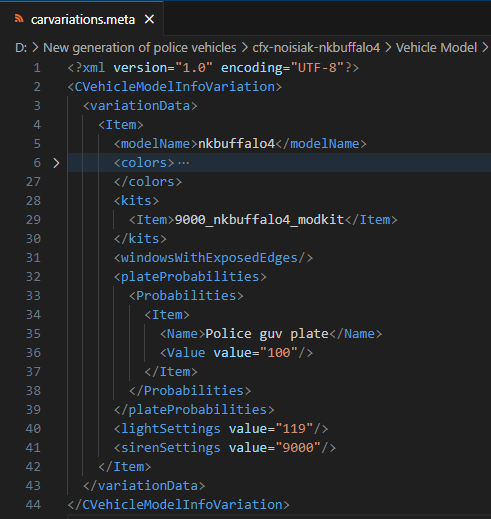
✅Step 3 – Edit carvariations.meta
- Open the file
- Find:
<sirenSettings>
- Set the same value as in
carcols.meta(e.g.9150)
✅Step 4 – Restart Server
- Save all changes
- Restart your server
If it doesn’t work:
- Repeat the steps carefully
- Make sure both values match exactly
Video Tutorial
We have also prepared a video tutorial for this issue.
We recommend watching it if you still have problems.
Notes
- Siren sound issues = missing functionality → use scripts
- Siren visual issues = ID conflict → fix in meta files
- These are two separate problems